AI Video Editor
Video Editor
Refine Your Creative Content Exactly as You Imagined
Fine-tune every element of your video ad—trim scenes, adjust color levels, layer background music, and add dynamic text overlays. Create professional-grade content ready for social campaigns, all without leaving your digiAd AI dashboard.
Edit My First Video Ad
INSIGHTS
From Raw AI Video to Campaign Ready Ad
Once your AI video ad is generated, your real competitive edge comes from the edit. Adjust pacing, layer background music, swap voices, and add dynamic text overlays - all in a single timeline inside digiAd AI. No external tools. No workflow friction. Just campaign-ready ads, faster
Edit without leaving digiAd AI.
Edit without switching apps - everything lives in digiAd AI
From first render to final mix-no round trip through desktop NLEs.
Conversion-optimized output - transitions, music, VO in one flow Export and deploy to Facebook, TikTok, and Instagram directly
Tune visuals, type, and audio for retention without slowing shipping.
What You Can Do ?
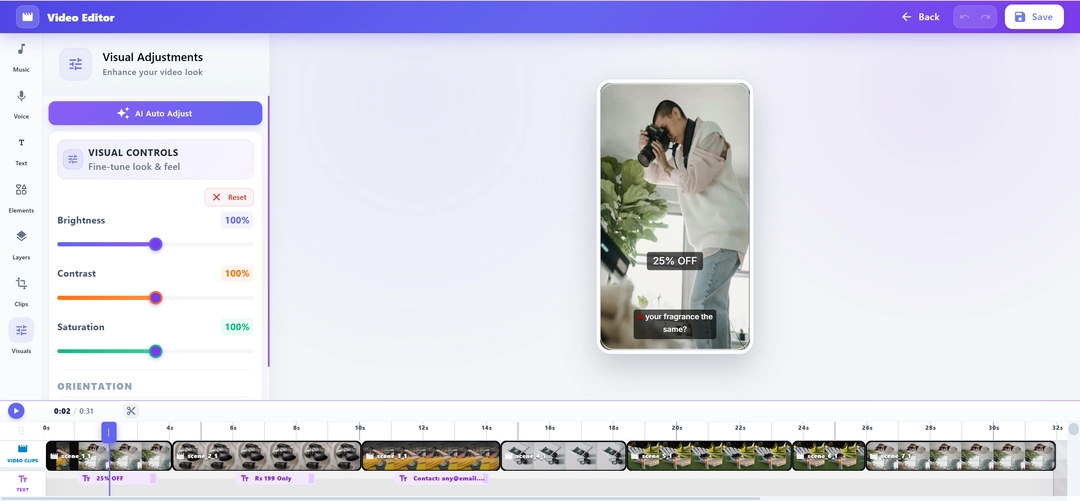
Visual Adjustments
Fine-tune the look of your video with pro-grade controls for brightness, contrast, and saturation, or use AI Auto-Adjust for an instant polish
Flexible Clip Reordering
Change your narrative on the fly. Drag and drop clips on the multi-track timeline to rearrange scenes and find the perfect story flow
Elements & Text Layering
Boost engagement by overlaying dynamic text, callouts, and stickers directly onto the canvas with precise frame-by-frame timing
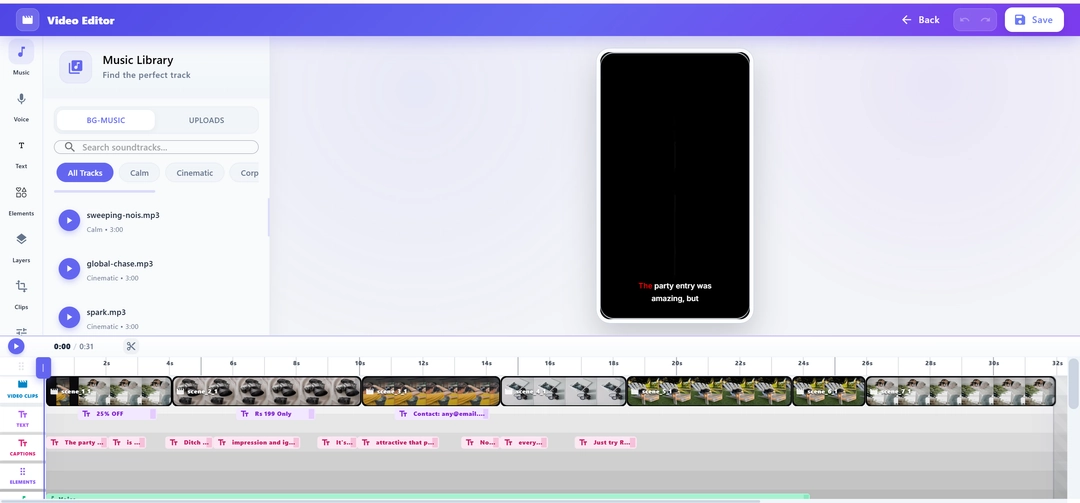
BG-Music & Audio Mixing
Access a curated library of background tracks and mix them perfectly against your regenerated AI voiceovers for a balanced, professional sound
Editor
Everything you need on one timeline
Preview how teams polish AI-generated ads before they go live
HOW IT WORKS
From Generated Video to Deployable Ad - In 4 Steps
Arrange, adjust, script, and mix in one timeline
Step 01
Timeline & Clip Arrangement
Import your generated video or uploaded assets into the multi-track timeline
Drag and drop to change the arrangement of clips and scenes instantly
Cut, trim, and split clips to nail the timing of your hook and call-to-action
Step 02
Visual Adjustments & Elements
Use the Visuals tab to adjust brightness, contrast, and overall color balance
Overlay elements like text, stickers, and progress bars onto the canvas
Apply professional-grade transitions between scenes for a cinematic flow
Step 03
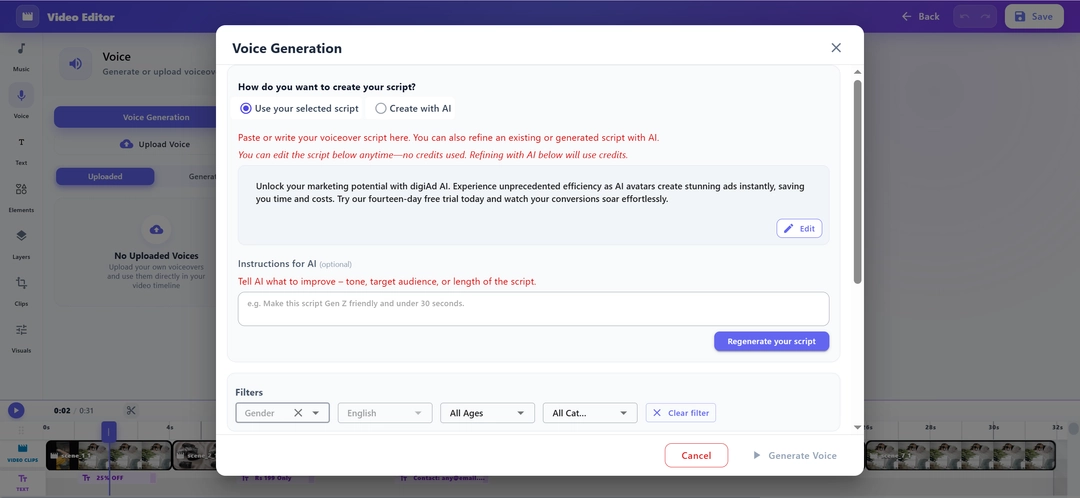
Script, Voice & Regeneration
Rewrite any line of your script and regenerate the AI voiceover instantly
Choose from male/female voices and regional accents to match your target audience - without re-rendering the whole project
Step 04
Background Music & Final Export
Choose background music from our curated library and mix volume levels precisely against your AI voiceover
Perform a final review, then save the polished creative and deploy directly to your campaigns
KEY FEATURES
What You Get ?
Visual & Color Adjustments
Take full control of your video's aesthetic. Adjust brightness, contrast, and saturation, or use AI Auto-Adjust for perfect lighting
Interactive Elements & Text
Boost engagement by overlaying dynamic text callouts, stickers, and progress bars directly onto the canvas with frame-perfect timing
Live Script & Voice Regeneration
Rewrite any line in the editor and instantly regenerate the AI voiceover. Swap between male and female voices with a single click
Timeline Clip Reordering
Rearrange the sequence of your clips with a simple drag-and-drop interface on the multi-track timeline to find the best narrative flow
Premium BG-Music Library
Premium Background Music Library - Access a curated library of royalty-free background tracks, mixed precisely against your AI voiceover for a polished, broadcast-quality sound
Cinematic Scene Transitions
Smoothly connect your scenes with professional transitions. Choose from a library of fades, wipes, and motion-based cuts
Every great video ad starts with the right edit, Yours is a minutes away
Refine transitions, swap AI voiceovers, add background music, and export campaign-ready video ads for Facebook, TikTok, and Instagram - all without leaving digiAd AI
Edit My First Video Ad
Schedule a Demo
Frequently Asked Questions
Find answers to common questions about digiAd AI and how it can help transform your digital marketing.
AI Video Editor FAQ
Q1. What can I do with the AI Video Editor in digiAd AI?
The AI Video Editor lets you fine-tune every element of your video — trim scenes, adjust audio levels, edit text overlays, change color grading, and add transitions. It's designed for marketers who need precise control without professional editing software.
Q2. Does the AI Video Editor work on AI-generated videos and uploaded videos?
Yes. You can edit any video created by our specialty tools or externally uploaded video files. If you haven't built anything yet, you can create the video before editing it using our script-to-video generator.
Q3. Do I need to install software to use the AI Video Editor?
No. The AI Video Editor is fully browser-based with no download, plugin, or software installation required. It runs on all major desktop browsers including Chrome, Safari, and Edge.
Q4. What audio editing capabilities does the editor include?
You can adjust volume levels for each track, fade in/out background music, replace tracks from the royalty-free library, and sync audio transitions perfectly to your scene cuts.
Q5. Can I add subtitles or captions in the AI Video Editor?
Yes. Auto-caption generation is available via the AI transcription tool. You can easily add AI captions automatically and then customize their styling, timing, and position on the screen.
Q6. Can I undo edits and revert to the original version?
Yes. The editor maintains a full edit history with unlimited undo/redo. You can also track performance of edited video ads identifying which versions resonate best with your audience.
Q7. How does the AI Video Editor compare to CapCut or DaVinci Resolve?
Our editor is purpose-built for marketers — integrating directly with campaign management. Once your edits are done, you can deploy your edited video in a campaign or publish edited video to social media instantly from the dashboard.