Social Post Studio
Image Publisher
Schedule and Publish Your Image Ads Across Every Social Platform
Open Social Post Studio from your dashboard, pick your image content, set captions and platforms, and schedule Feed posts, Stories, or Carousels — or post instantly — all in one scheduling popup.
Generate My First Ad
See How It Works
No credit card required
Free to start
Image Publisher runs inside Social Post Studio. Click Create/New Post to open the scheduler, browse Upload, Ad Creatives, or AI content tabs, and publish to Facebook, Instagram, TikTok, and more.
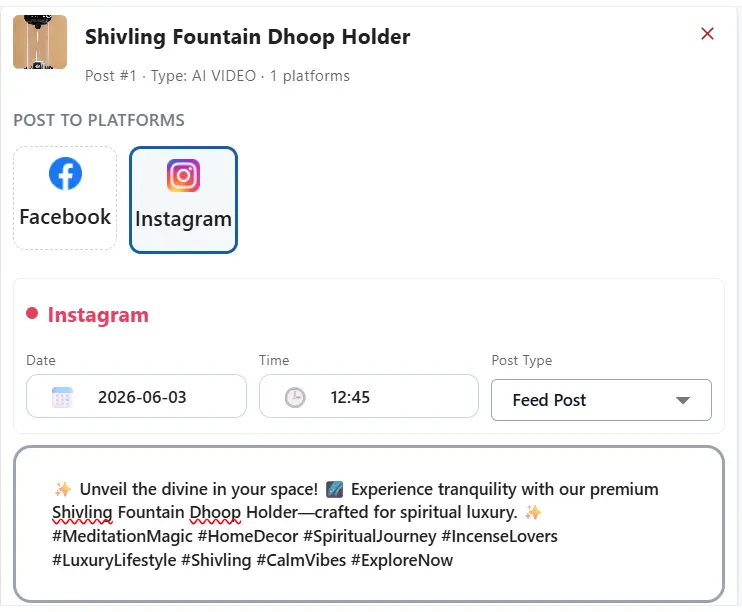
Configure post type and date per platform, preview on the left, then Schedule for your calendar or use Post Now to go live immediately.
Social Post Studio
One workflow for selecting content, choosing platforms, scheduling, previewing, and tracking performance after publish.
INSIGHTS
Your Complete Social Post Studio Workflow for Images
Go to Social Post Studio in the left sidebar (below AI Videos), open Create/New Post, and use the right panel to choose uploads, ad library creatives, or AI-generated assets. Add your caption, select accounts, set post type and time per platform, preview on the left, then Schedule or Post Now.
Pick content. Set platforms. Schedule — done.
A guided publisher flow for scheduling and publishing image posts from one dashboard.
**Upload:** Upload a fresh image or video directly from your computer.
**Ad Creatives:** Pick from your ad library. **AI Video / AI Avatar Generation:** Select AI-generated videos or avatars you have created.
**Caption:** Type in the caption/description for your post.
**Select Platforms:** Check the boxes for the social media accounts you want to post to (e.g., Facebook, Instagram, TikTok). Ensure captions meet each platform’s character limit.
**Preview:** Look at the left side of the screen to see how your media will look.
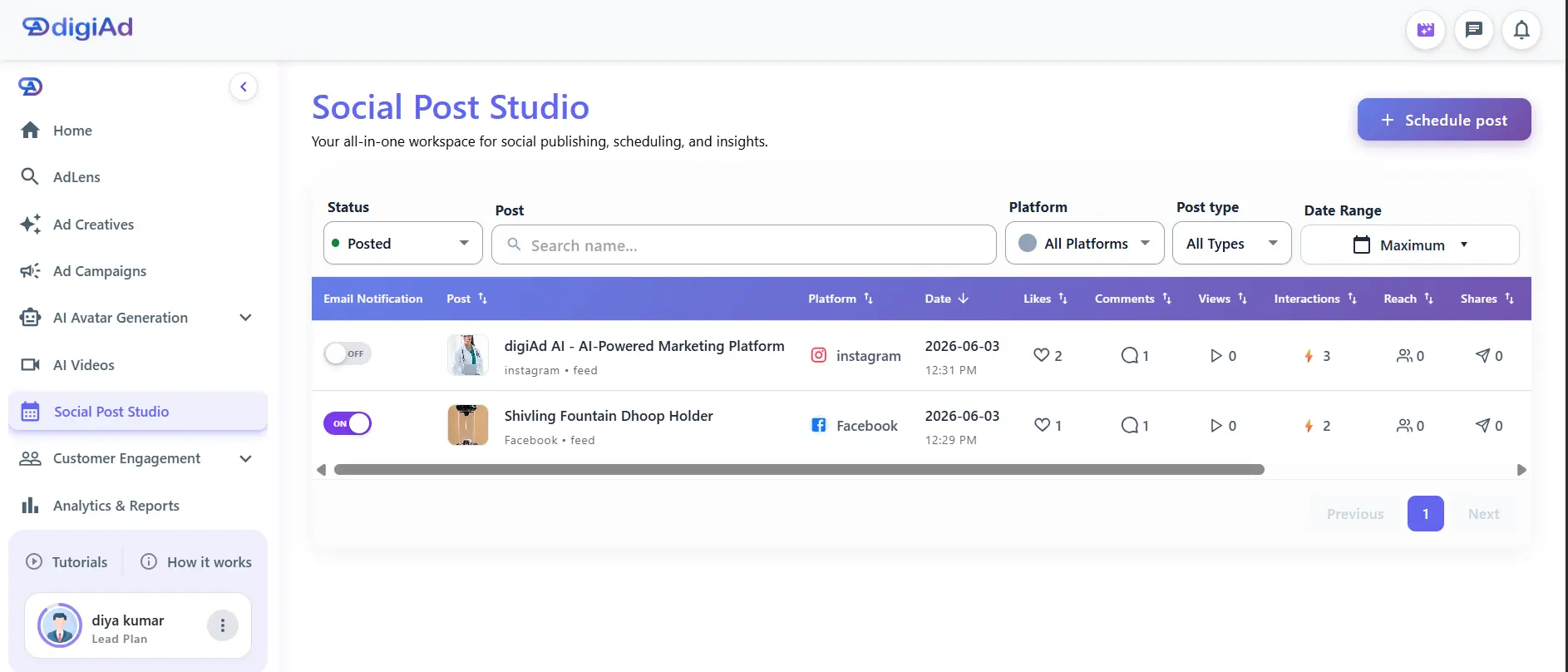
**Submit:** Click **Schedule** to add it to your calendar, or use **Post Now** to go live immediately. Toggle **Email Notification** ON to track performance (3 credits per email, every 6 hours).
What You Can Do ?
**Upload:** Upload a fresh image or video directly from your computer.
Browse the Upload tab on the right side of the scheduling popup.
**Ad Creatives:** Pick an existing image, video, or carousel from your ad library.
Reuse creatives you have already built in digiAd AI.
**Tip:** Click **Apply to all** for the same post type and time.
Set **Post Type** and **Date & Time** for the first platform, then apply to every platform you selected.
**Submit:** **Schedule** or **Post Now**
Click **Schedule** to add it to your calendar, or use **Post Now** to go live immediately after you preview on the left.
Post Flow Ready
Schedule Feed, Stories, and Carousel Images From One Studio
Preview how teams use Social Post Studio to plan image posts across Instagram, Facebook, TikTok, and more — with calendar scheduling or instant publish.
Feed & square
Schedule 1:1 and 4:5 feed posts with captions and platform-specific timing.
Social
Stories
Set Story post type and schedule go-live time per connected account.
Stories
Carousel posts
Pick carousel creatives from Upload or Ad Creatives and publish across platforms.
Carousel
HOW IT WORKS
Schedule Posts Across Platforms - In 6 Steps
Choose content from your library, select target platforms, set your timeline, preview the layout, and automate your publishing.
Step 01
Go to Social Post Studio
In the left sidebar menu, click on Social Post Studio (located right below AI Videos).
Click on the Create/New Post button to open the scheduling popup.
Step 02
Select Your Content
On the right side of the popup, select the content you want to post by browsing the tabs:
**Upload:** Upload a fresh image or video directly from your computer.
**Ad Creatives:** Pick an existing image, video, or carousel from your ad library.
**AI Video / AI Avatar Generation/AD Lens:** Select AI-generated videos or avatars you have created.
Step 03
Add Details & Select Platforms
**Caption:** Type in the caption/description for your post. (Ensure it meets the character limit for your chosen platforms).
**Select Platforms:** Check the boxes for the social media accounts you want to post to (e.g., Facebook, Instagram, TikTok).
Step 04
Set the Date and Time
For each platform you selected, you need to configure the schedule:
**Post Type:** Select how you want it to appear (e.g., Reel, Feed, Story, or Carousel).
**Date & Time:** Pick the exact date and time for it to go live. (Note: The scheduled time cannot be in the past).
**Tip:** If you want the exact same time and post type for all platforms, set it for the first platform and click **Apply to all**.
Step 05
Preview & Publish
**Preview:** Look at the left side of the screen to see a preview of how your media will look.
**Submit:** Click **Schedule** to add it to your calendar. (If you want it to go live immediately, you can use the **Post Now** button instead).
KEY FEATURES
What You Get ?
Go to Social Post Studio
In the left sidebar menu, click on Social Post Studio (located right below AI Videos). Click on the Create/New Post button to open the scheduling popup.
Upload, Ad Creatives & AI Video
Upload a fresh image or video from your computer, pick from your ad library, or select AI-generated videos or avatars you have created.
Caption & Select Platforms
Type in the caption/description for your post (within platform character limits). Check the boxes for Facebook, Instagram, TikTok, and other accounts.
Post Type, Date & Time
Select Reel, Feed, Story, or Carousel per platform. Pick the exact date and time (not in the past). Use Apply to all to mirror the first platform’s settings.
Preview & Publish
Preview on the left. Click Schedule to add to your calendar, or Post Now to go live immediately.
Track Metrics
Find published posts in your Posted list. Toggle Email Notification ON for performance reports every 6 hours (3 credits per email).
Ready to schedule your first image post from Social Post Studio?
Pick your content, choose your platforms, set post type and time, preview, and Schedule or Post Now — all from one dashboard.
Generate My First Ad Free
Schedule a Demo
Frequently Asked Questions
Find answers to common questions about digiAd AI and how it can help transform your digital marketing.
Image Publisher FAQ
Q1. What is the Image Publisher in digiAd AI?
The Image Publisher is a social media scheduling and publishing tool that lets you automatically post image creatives to Instagram, Facebook, and TikTok from a single dashboard. It eliminates the need to switch between different platforms manually.
Q2. Which social media platforms does the Image Publisher support?
At launch, we support Instagram (Feed, Stories, Carousel), Facebook (Feed, Stories), and TikTok. If you have video assets, you can also schedule video content too using our dedicated video publishing studio.
Q3. Can I publish the AI-generated images I create in digiAd AI directly through Image Publisher?
Yes. Any creative generated using our platform can be sent directly to the Image Publisher queue. You can easily create the images you'll publish and then schedule them in one seamless creation-to-live workflow.
Q4. Can I schedule posts in advance for multiple platforms simultaneously?
Yes. You can schedule a single post to go live on multiple platforms at once or set optimized times for each. After your content is live, you can measure post performance after publishing to see which times and platforms drive the best results.
Q5. Does the Image Publisher support bulk scheduling?
Yes. You can upload multiple images in a batch, assign different captions, and schedule them across multiple dates to plan your entire content calendar in advance.
Q6. What happens if a scheduled post fails to publish?
If a post fails due to an API issue, we will notify you and keep the post in a failed queue for a manual retry. This feature is currently in high demand — you can join the early access waitlist to be among the first businesses to use it.
Q7. Can I add captions and hashtags to scheduled posts?
Yes. Each post supports custom captions and hashtag sets, which you can edit or generate using AI. This unified dashboard allows you to manage ad campaigns alongside your organic posts to maintain total brand harmony.
.webp)
.webp)
.webp)