Talking Avatar

AI AVATAR REELS

Narrate your brand storywith a lifelike AI avatar in minutes

Our Talking Avatar transforms any brand script into a natural, lip-synced avatar video with realistic head movements — ready to publish on social, ads, or your website in minutes.

Generate My First Avatar Video

No credit card required

Free plan available

INSIGHTS

AI Avatar Reels for Social Campaigns - From Brief to Published in Minutes

Skip the studio. Go from product URL to a polished AI avatar reel in under 5 minutes - with auto-generated scripts, 20+ avatar choices, and direct publishing to TikTok, Instagram, and Facebook.

Script to Reel.

Go from product URL to published reel in under a minutes

Choose from Gen Z, Commercial, Motivational, and 3 more script tones

Publish directly to TikTok, Instagram, and Facebook - no re-exporting needed

What You Can Do ?

AI Script + Reel Pipeline

Auto-generate on-brand scripts and convert them into avatar-led social reels - all inside a single guided workflow. No switching tools.

Avatar or No-Avatar Paths

Choose a presenter-led AI Avatar reel or go asset-only - both paths output platform-ready videos with captions and hashtags.

Asset-Aware Video Creation

Use scraped website images, uploaded assets, or AI-generated visuals from references for final video output. - Clear and specific. Keep.

Draft & Direct Publishing

Save as draft or publish instantly to TikTok, Instagram, and Facebook - video, caption, and hashtags included in one click.

HOW IT WORKS

6 Steps from Product URL to Published Reel

From product details to platform publishing, each step is built for fast social execution

Step 01

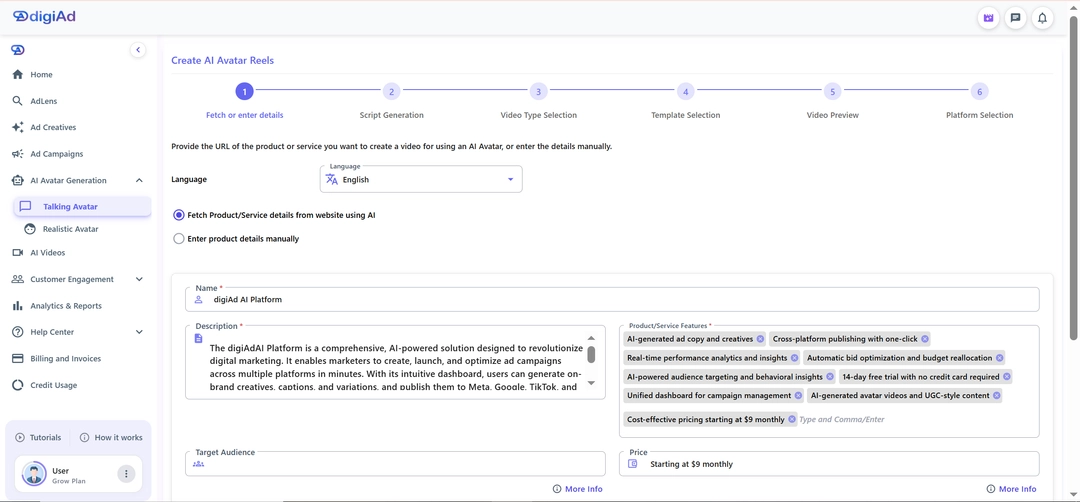
Fetch or Enter Product Details

Fetch product or service details from a website URL using AI

Or add details manually: name, description, features, audience, pricing, and promotions

Continue to script generation after details are finalized

Step 02

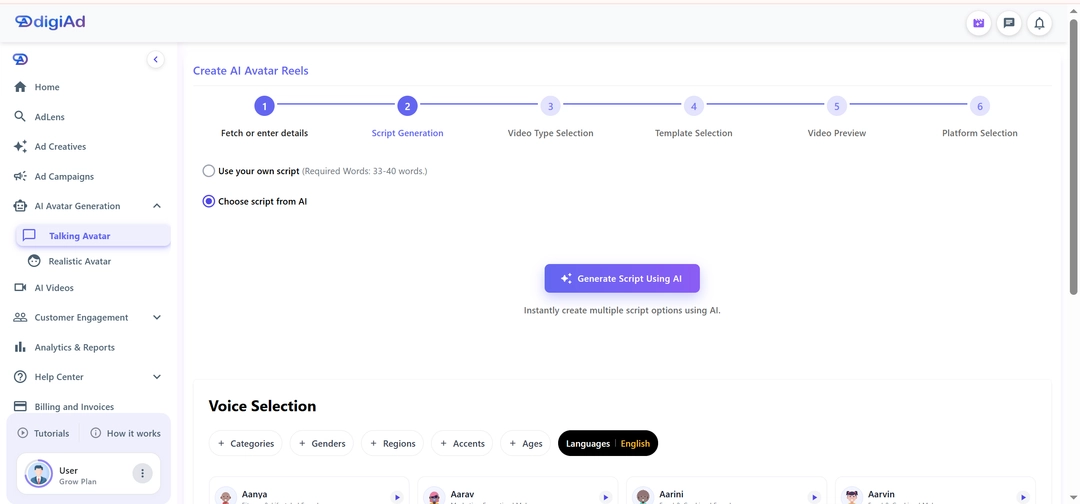
Generate or Add Script

Bring your own script or generate AI options

Pick a tone: Gen Z, Commercial, Motivational, Engaging, or Product Highlights

Edit and finalize before moving to video

Step 03

Choose Video Type

Continue with AI Avatar for presenter-led reels

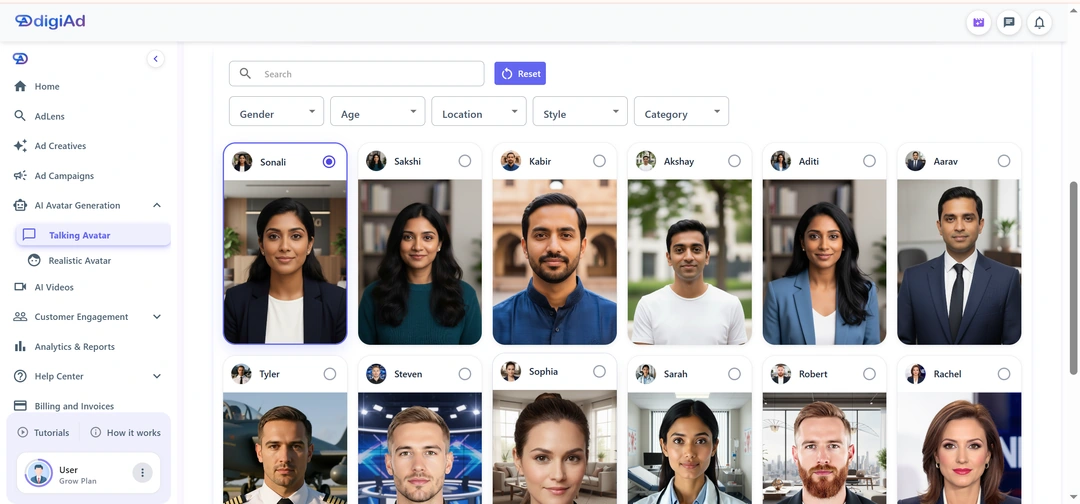
Search avatars and filter by gender, age, location, style, and category

Or continue without AI Avatar for asset-led reel production

Step 04

Select Templates & Assets

Use scraped images from URL-based flow or upload images manually for manual detail flow

Choose Assets to Make Video or AI Generated Video using uploaded references

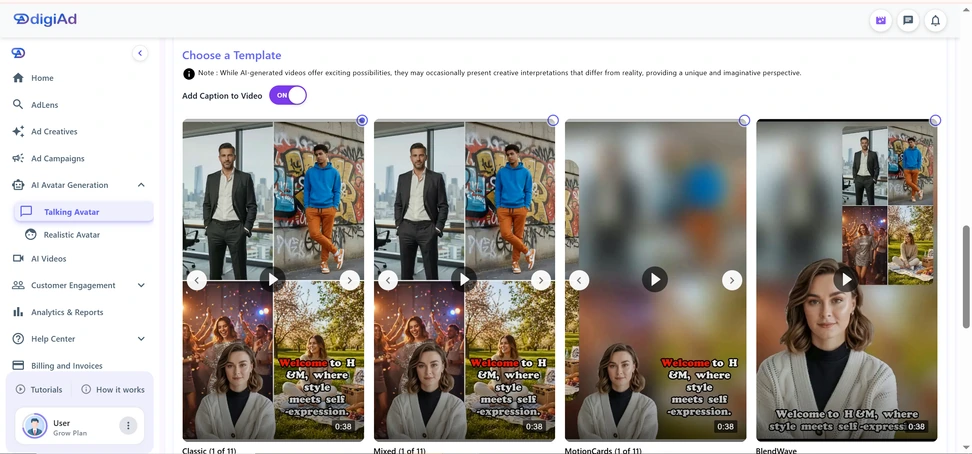
Pick template, caption toggle, and style options before generation

Step 05

Preview Video & Caption

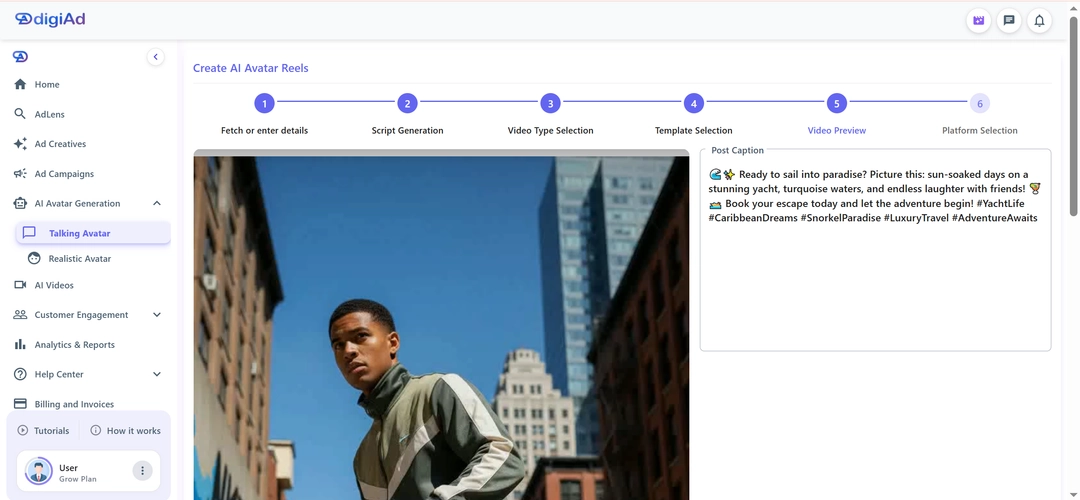
Review the generated reel in preview player for transitions, visuals, and flow

Edit the auto-generated post caption, emojis, and hashtags if needed

Download video locally or continue to publishing

Step 06

Select Platform & Publish

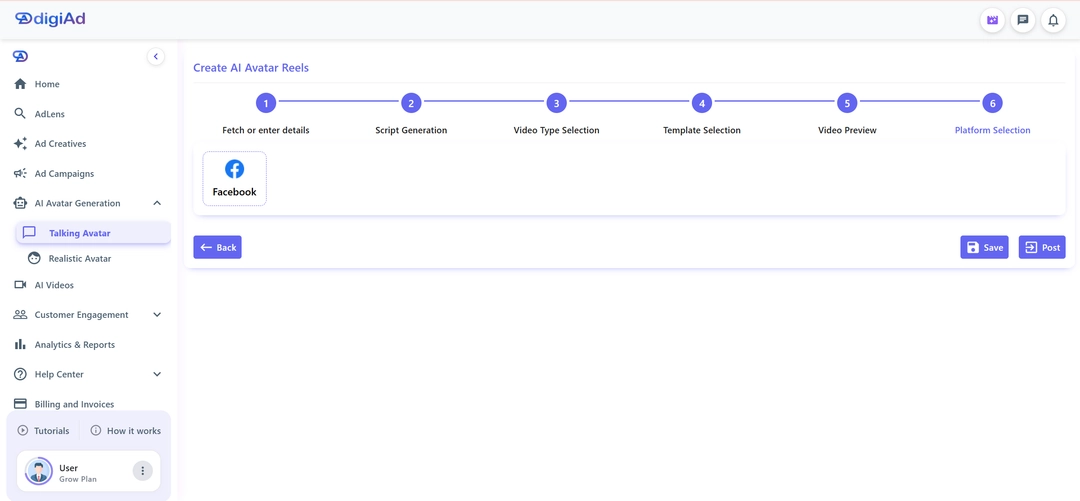
Choose a connected and authorized platform like TikTok, Instagram, or Facebook

Save as draft to publish later or post instantly

Publish video with selected caption and hashtags to the chosen platform

KEY FEATURES

What You Get ?

URL-Based Product Fetch

Enter a website URL and let AI extract product/service details to auto-seed your reel workflow.

Tone-Based Script Generation

Generate multiple script options in 5 tones - Gen Z, Motivational, Commercial, Engaging, and Product Highlights - then pick your favorite.

AI Avatar Selection

Search avatar library and apply filters like gender, age, location, style, and category for precise casting.

Template + Asset Control

Select template, captions, and style while choosing between direct assets or AI-generated video mode.

Caption & Hashtag Assist

Get AI-generated captions with platform-optimized hashtags - edit in seconds before you hit publish.

Multi-Platform Publishing

Save as draft or publish reels to connected social accounts from a single final step.

Your Next AI Avatar Video Is Minutes Away Start Free Today.

Go from product URL to a published TikTok, Instagram, or Facebook avatar video - in minutes. No designer. No video editor. Just results

Generate My First Avatar Video

View Avatar Gallery

Frequently Asked Questions

Find answers to common questions about digiAd AI and how it can help transform your digital marketing.

Talking Avatar FAQ

Q1. What is a Talking Avatar in digiAd AI?

A Talking Avatar is an AI-generated video presenter that delivers your brand script with natural lip-sync and head movements. If you want a truly unique face for your brand, you can also build a custom brand character instead of using our standard library.

Q2. Can I choose different avatar appearances (age, ethnicity, gender)?

Yes. digiAd AI offers a diverse library of appearances including multiple ethnicities, age ranges, and professional styles. Once your avatar is live, you can track avatar video performance to see which demographics respond best to your digital spokesperson.

Q3. What languages and accents does the Talking Avatar support?

The Talking Avatar currently supports the English language. We are actively working on adding more languages and accent options, which will be available in upcoming updates.

Q4. How long can the Talking Avatar script be?

Scripts can range from 15 to 60 seconds. Once generated, you can easily use your avatar in a Video Campaign or add avatar to a UGC-style video to create authentic social content at scale.

Q5. How is a Talking Avatar different from a Realistic Avatar?

Talking Avatars focus on head and facial animation for narration. If you need full-body movement or product interactions, you should upgrade to full-body Realistic Avatar for more complex brand storytelling.
LIVE

digiAd Give Away · Win up to ₹50,000 INR cash · Subscribe any monthly plan before 30 June 2026 · Win ₹399→₹4K · ₹999→₹10K · ₹1,999→₹20K · ₹4,999→₹50K . One winner per plan · Draw: 1–5 July · Cash reward · T&C apply||

digiAd Give Away · Win up to ₹50,000 INR cash · Subscribe any monthly plan before 30 June 2026 · Win ₹399→₹4K · ₹999→₹10K · ₹1,999→₹20K · ₹4,999→₹50K . One winner per plan · Draw: 1–5 July · Cash reward · T&C apply||

00

days

:

00

hrs

:

00

min

:

00

sec

🎁

LIVE

00d:00h:00m:00s

digiAd Give Away · Win up to ₹50,000 INR cash · Subscribe any monthly plan before 30 June 2026 · Win ₹399→₹4K · ₹999→₹10K · ₹1,999→₹20K · ₹4,999→₹50K . One winner per plan · Draw: 1–5 July · Cash reward · T&C apply||

digiAd Give Away · Win up to ₹50,000 INR cash · Subscribe any monthly plan before 30 June 2026 · Win ₹399→₹4K · ₹999→₹10K · ₹1,999→₹20K · ₹4,999→₹50K . One winner per plan · Draw: 1–5 July · Cash reward · T&C apply||

🎁
Talking Avatar

Narrate your brand storywith a lifelike AI avatar in minutes

Our Talking Avatar transforms any brand script into a natural, lip-synced avatar video with realistic head movements — ready to publish on social, ads, or your website in minutes.

AI talking avatar Hailey for brand storytelling and social video narration
AI talking avatar Austin for product explainers and ad voiceover delivery
AI talking avatar Sophia for creator-style social media marketing videos
AI talking avatar Kevin for professional brand presenter video content
AI talking avatar Hailey for brand storytelling and social video narration
AI talking avatar Austin for product explainers and ad voiceover delivery
AI talking avatar Sophia for creator-style social media marketing videos
AI talking avatar Kevin for professional brand presenter video content
AI talking avatar workflow dashboard for social reel production and publishing

INSIGHTS

AI Avatar Reels for Social Campaigns - From Brief to Published in Minutes

Skip the studio. Go from product URL to a polished AI avatar reel in under 5 minutes - with auto-generated scripts, 20+ avatar choices, and direct publishing to TikTok, Instagram, and Facebook.

  • Go from product URL to published reel in under a minutes

  • Choose from Gen Z, Commercial, Motivational, and 3 more script tones

  • Publish directly to TikTok, Instagram, and Facebook - no re-exporting needed

What You Can Do ?

AI Script + Reel Pipeline

Auto-generate on-brand scripts and convert them into avatar-led social reels - all inside a single guided workflow. No switching tools.

Avatar or No-Avatar Paths

Choose a presenter-led AI Avatar reel or go asset-only - both paths output platform-ready videos with captions and hashtags.

Asset-Aware Video Creation

Use scraped website images, uploaded assets, or AI-generated visuals from references for final video output. - Clear and specific. Keep.

Draft & Direct Publishing

Save as draft or publish instantly to TikTok, Instagram, and Facebook - video, caption, and hashtags included in one click.

HOW IT WORKS

6 Steps from Product URL to Published Reel

From product details to platform publishing, each step is built for fast social execution

01

Fetch or Enter Product Details

  • Fetch product or service details from a website URL using AI
  • Or add details manually: name, description, features, audience, pricing, and promotions
  • Continue to script generation after details are finalized
Fetch or Enter Product Details
02

Generate or Add Script

  • Bring your own script or generate AI options
  • Pick a tone: Gen Z, Commercial, Motivational, Engaging, or Product Highlights
  • Edit and finalize before moving to video
Generate or Add Script
03

Choose Video Type

  • Continue with AI Avatar for presenter-led reels
  • Search avatars and filter by gender, age, location, style, and category
  • Or continue without AI Avatar for asset-led reel production
Choose Video Type
04

Select Templates & Assets

  • Use scraped images from URL-based flow or upload images manually for manual detail flow
  • Choose Assets to Make Video or AI Generated Video using uploaded references
  • Pick template, caption toggle, and style options before generation
Select Templates & Assets
05

Preview Video & Caption

  • Review the generated reel in preview player for transitions, visuals, and flow
  • Edit the auto-generated post caption, emojis, and hashtags if needed
  • Download video locally or continue to publishing
Preview Video & Caption
06

Select Platform & Publish

  • Choose a connected and authorized platform like TikTok, Instagram, or Facebook
  • Save as draft to publish later or post instantly
  • Publish video with selected caption and hashtags to the chosen platform
Select Platform & Publish

KEY FEATURES

What You Get ?

URL-Based Product Fetch

Enter a website URL and let AI extract product/service details to auto-seed your reel workflow.

Tone-Based Script Generation

Generate multiple script options in 5 tones - Gen Z, Motivational, Commercial, Engaging, and Product Highlights - then pick your favorite.

AI Avatar Selection

Search avatar library and apply filters like gender, age, location, style, and category for precise casting.

Template + Asset Control

Select template, captions, and style while choosing between direct assets or AI-generated video mode.

Caption & Hashtag Assist

Get AI-generated captions with platform-optimized hashtags - edit in seconds before you hit publish.

Multi-Platform Publishing

Save as draft or publish reels to connected social accounts from a single final step.

Your Next AI Avatar Video Is Minutes Away Start Free Today.

Go from product URL to a published TikTok, Instagram, or Facebook avatar video - in minutes. No designer. No video editor. Just results

Frequently Asked Questions

Find answers to common questions about digiAd AI and how it can help transform your digital marketing.

digiAd AI - AI-Powered Marketing Platform Logo

AI-powered ad platform helping marketers create, launch, and optimize campaigns in minutes.

Product

Contact Us

sales@digiad.ai

Need Help?

Legal Policy

© 2025 Xalt Analytics Private Limited. All rights reserved.
InstagramTikTok