Video Ads
Video Ad
Launch Video Ad CampaignsAcross Video Platforms Instantly
Run your video ads on YouTube, TikTok, Facebook, Instagram, and more from one place.
Define your audience, set your budget, and go live without touching a single external platform.
Launch My First Video Ad
No credit card required
Free plan available
INSIGHTS
Your AI-Powered Video Campaign Studio
Running video ad campaigns manually is slow and repetitive. First, you create a video, download it, then log in to YouTube Ads, Meta, TikTok Ads Manager, and other platforms to upload the same video and set up the same targeting again and again. With digiAd AI, you can create AI videos, edit them, and launch campaigns across YouTube, Facebook, Instagram, TikTok, Snapchat, and X from one dashboard. Just enter your campaign details once, including objective, budget, schedule, audience, age, gender, and location, then launch everywhere instantly.
Assets in. Ads out.
Sequence, transition, and export without a traditional edit bay.
**Create, Edit & Launch In One Place :** Generate AI Videos Or Edit Your Own Footage — Then Go Live Instantly
**One Upload, Six Platforms :** YouTube, Facebook, Instagram, TikTok, Snapchat & X — All From A Single Dashboard
**Full Campaign Control :** Set Objective, Budget, Schedule, Audience, Location & Gender — No Platform Switching Needed
What You Can Do ?
Hybrid Scripting Options
Provide your own custom script with built-in word counters or let AI generate high-converting variations based on your product and language
Dual Generation Modes
Choose 'Manual' for full control over uploads or 'AI-Generated' mode for automated video creation using scraped images and smart templates
Language-Native Templates
Run multilingual campaigns without extra effort. Templates, text direction, fonts, and animations automatically adapt various languages so your ad looks native to every market.
Aspect-Ratio Intelligence
Templates and assets are dynamically filtered to match your chosen format (9:16, 16:9), ensuring perfect framing every time
EXAMPLES
Video ads built for conversion
Explore frameworks teams use before they open the generator
HOW IT WORKS
Create Your First Video Ad in 4 Steps
Step 01
High-Retention Objective
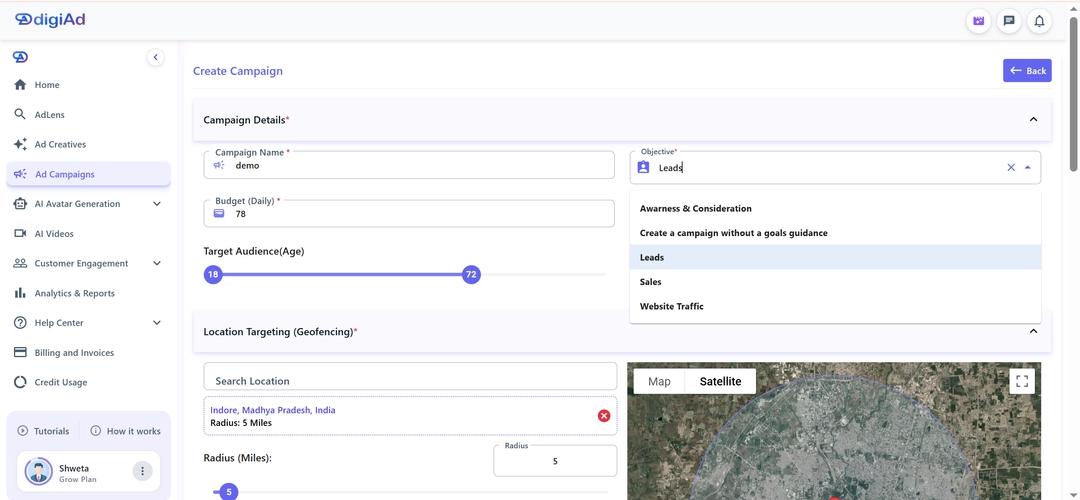
Select Ad Campaigns from the sidebar
Set the Objective to Brand Awareness or Video Views
The system will prioritize showing your ad to users who watch videos longer than 10 seconds
Step 02
Resource & Timeline Guardrails
Allocate the Daily Budget validated against your linked account currency
Set a Start and End Date for your promotion
A minimum 7-day run is recommended to allow the AI to learn user behavior
Step 03
Interest-Based Demographics
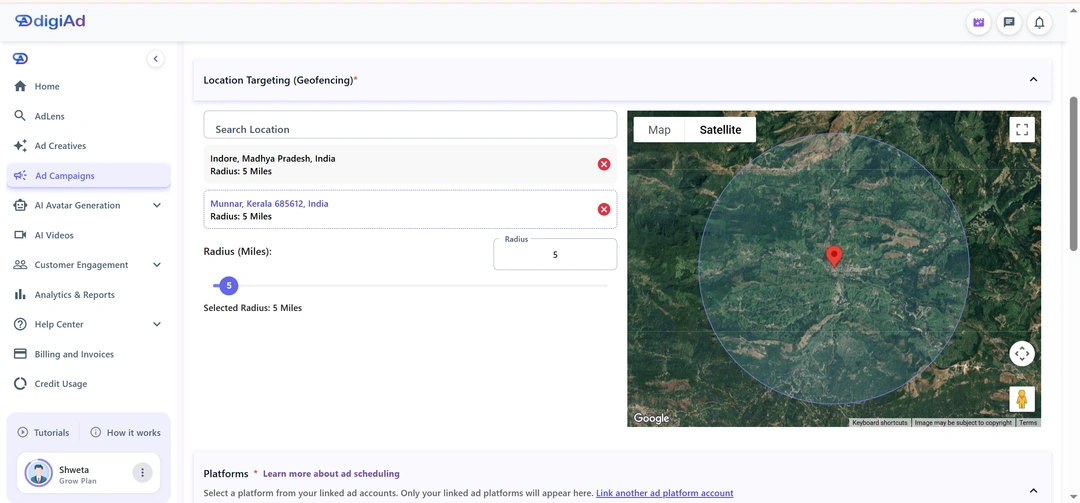
Geo-Fencing: Plot your target radius on the map
User Interests: Select segments like Technology, Entertainment, or Lifestyle
Narrow down to the primary demographic that consumes your video style
Step 04
Placement & CPM Bidding
Select your linked YouTube, TikTok, or Instagram accounts
Set the Bidding Strategy to Maximize Conversions or a specific Target CPA
Finalize your settings and launch your high-impact video campaign
KEY FEATURES
What You Get ?
Automated Storyboarding
Drop in your raw clips in any order. Our AI analyses each scene and arranges them into a logical, persuasive narrative so your ad flows like it was edited by a pro
Premium Ad Templates
Don't start from scratch. Use proven, high-converting video frameworks designed specifically for e-commerce and lead generation
Dynamic Visual Transitions
Connect your scenes perfectly with a built-in library of professional-grade cuts, fades, and visual effects
Multi-Format Exporting
Export your finished ad simultaneously in 9:16 (TikTok/Reels), 1:1 (Instagram/Facebook feed), and 16:9 (YouTube/LinkedIn) — one click, three formats, zero re-editing
Background Music Integration
Access a vast library of licensed, trending audio tracks to set the perfect emotional tone for your video ad
Centralized Ad Library
Securely store all your generated video ads in one dashboard, ready to be attached to your active ad platform accounts
Launch scroll-stopping video ads in minutes, not weeks
Turn raw assets into paced, platform-ready commercials from one end-to-end studio
Launch My First Video Ad
Schedule a Demo
Frequently Asked Questions
Find answers to common questions about digiAd AI and how it can help transform your digital marketing.
Video Campaigns FAQ
Q1. What are Video Campaigns in digiAd AI?
Video Campaigns in digiAd AI let you deploy video ads across major social and video platforms — including YouTube, Facebook, Instagram, X, Snapchat and TikTok — from a single dashboard. You create your video, set your targeting and budget, and the platform manages campaign trafficking and optimization.
Q2. Which platforms do Video Campaigns support?
digiAd AI Video Campaigns support placements on YouTube (in-stream and bumper ads), Facebook and Instagram (Feed, Reels, Stories), X (Feed), Snapchat (Stories, Spotlight, Discover Feed, In-Stream) and TikTok (In-Feed ads). This cross-platform management means you can run a unified video strategy without juggling separate ad accounts.
Q3. What video format and length is best for video ads?
For most social platforms, 15– 60 second videos perform best for in-feed placements. digiAd AI supports video generation in 15, 30, and 60-second formats, making it easy to create ads optimized for different platforms.
Q4. Do I need to create my own video to run Video Campaigns?
Not necessarily. digiAd AI's AI Video Studio can create professional videos from your product images or text descriptions. You can create your video with AI before launching to create a fully integrated content-to-campaign workflow without the need for high-end production gear.
Q5. How does audience targeting work for Video Campaigns?
You can target by demographics, interests, and lookalike audiences. For YouTube, you can also target by search keywords, topics, and specific channel placements to reach viewers watching relevant content.
Q6. How does digiAd AI optimize my video campaign budget?
The AI monitors video completion rates, view-through rates, click-through rates, and conversion data in real time. It reallocates budget toward the highest-performing placements, audiences, and creatives automatically, maximizing your ROAS.
Q7. What video ad metrics can I track in digiAd AI?
You can track video views, view- through rate (VTR), completion rates, cost per view (CPV), and conversions — all available to track video campaign performance in our Performance Dashboard.
Q8. Can I run different video creatives for different audience segments?
Yes. You can assign different video creatives to different audience segments. This personalization showing a product-demo video to cold audiences and a testimonial video to retargeting audiences — significantly improves campaign performance.
Q9. Can I A/B test video creatives within a Video Campaign?
Yes. You can run multiple video variants within a campaign. digiAd AI identifies the winning creative based on your goals. To expand your reach, you could also run image ads with Display Campaigns alongside your video sets.
Q10. What's the minimum budget to run Video Campaigns effectively?
Video campaigns can be started with as little as ₹100–₹1000 per day. You can also schedule and publish your videos to social platforms like Instagram Reels or YouTube Shorts to maximize your organic presence while running paid ads.
Q11. Can I use UGC-style videos in Video Campaigns?
Yes. Videos produced using our specialty tools can be deployed directly into Video Campaigns. You can generate UGC-style videos for social campaigns which typically drive higher trust and click-through rates on mobile-first platforms.