Search Boost

Search Ad

Reach Customers the Moment They Search for You

Launch text ads that appear directly in search results when high-intent users are actively looking for your product or service. Set your budget, define your audience, and go live — all from your digiAd AI dashboard in one place.

Launch My First Search Ad

No credit card required

Free plan available

INSIGHTS

Your Master AI Search Copywriter

Writing search ads manually means counting characters, testing headline combinations, and rewriting descriptions for every campaign. digiAd's Search Ad Generator eliminates that work. Paste your URL or keywords, and get headlines and descriptions in minutes, all within the exact character limits of Google and X (Twitter).

Keywords in. RSAs out.

CTR-focused hooks

Keyword-smart copy

Export-ready

What You Can Do ?

Text-Only Precision

A dedicated search copywriting workspace - no image tools, no distractions. Every field is built for Google and X (Twitter) text ads: headlines, descriptions, and CTAs only.

Flawless Character Counts

Never rewrite an ad again. Our engine strictly enforces 30-character headlines and 90-character descriptions every single time.

High-Intent CTAs

Choose from a curated library of high-intent CTAs each one tested and optimized for search engine click-through performance.

Multi-Platform Ad Sync

Generate headlines and descriptions in one flow, perfectly formatted for both Google’s RSAs and X (Twitter) text ads.

Examples

Search Copy that Fits the Slot

Preview headline and description patterns teams use before going live

HOW IT WORKS

4 Steps to High-Performing Search Copy

Step 01

High-Intent Lead Objective

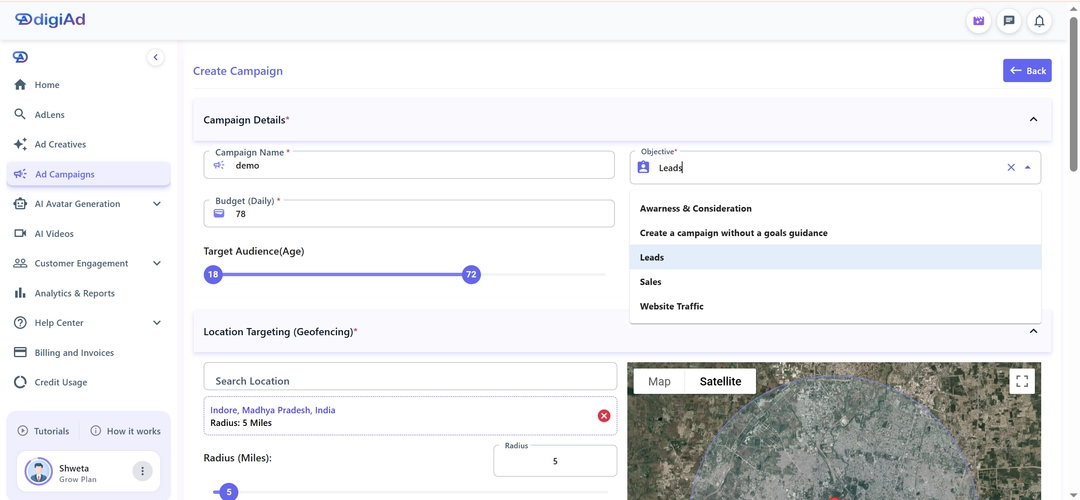
Select Ad Campaigns from the sidebar

Set the Objective to Lead Generation or Direct Sales

This captures people actively searching for your service or product

Step 02

Performance Budgeting

Set your Daily Budget for high-value search capture

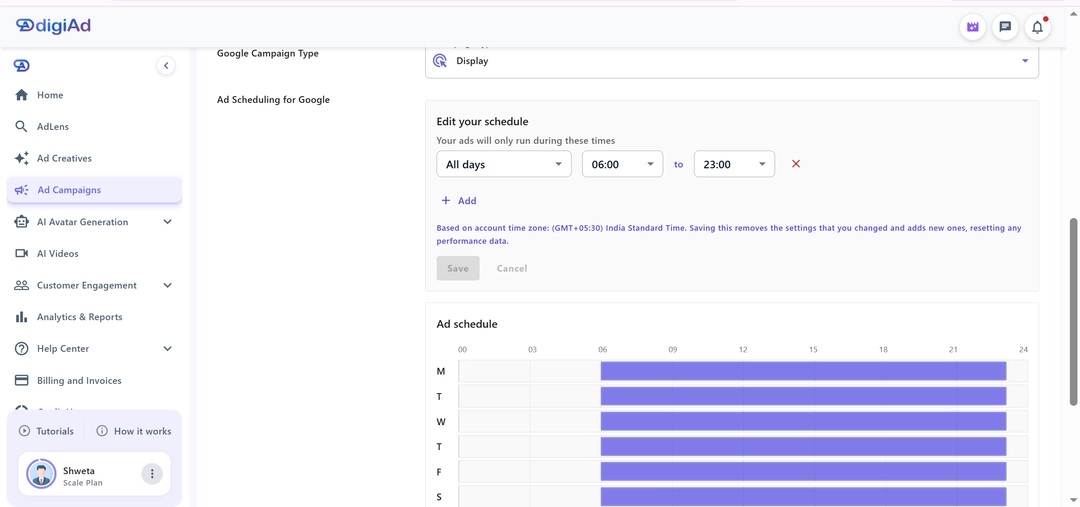
Schedule your ads specifically for hours when your business is available

Maximize your response rate by aligning with operating hours

Step 03

Search Interest & Location

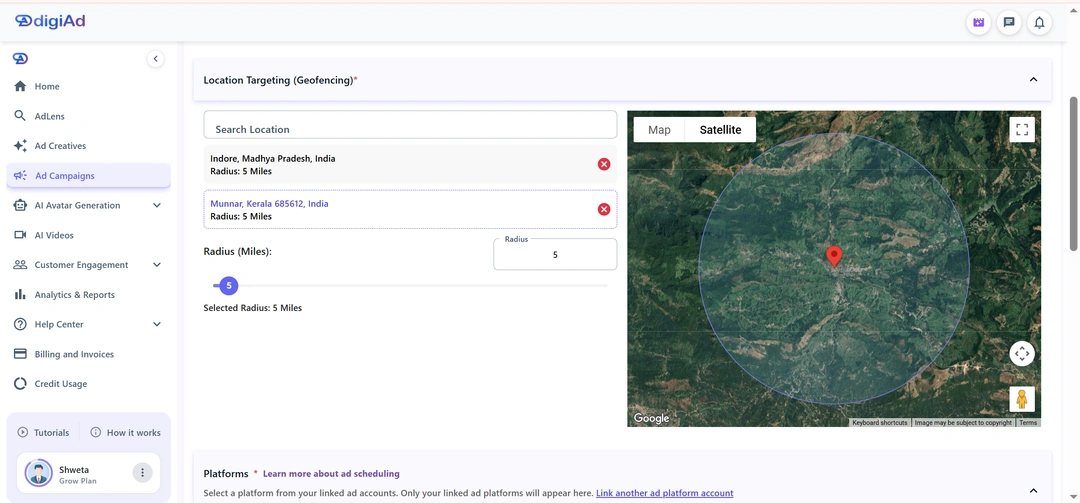
Define the Geo-Fencing for where your service is available

Focus on target search terms as the primary indicator of intent

Demographics are optional where search intent is the main driver

Step 04

Keyword Engineering & CPA Bidding

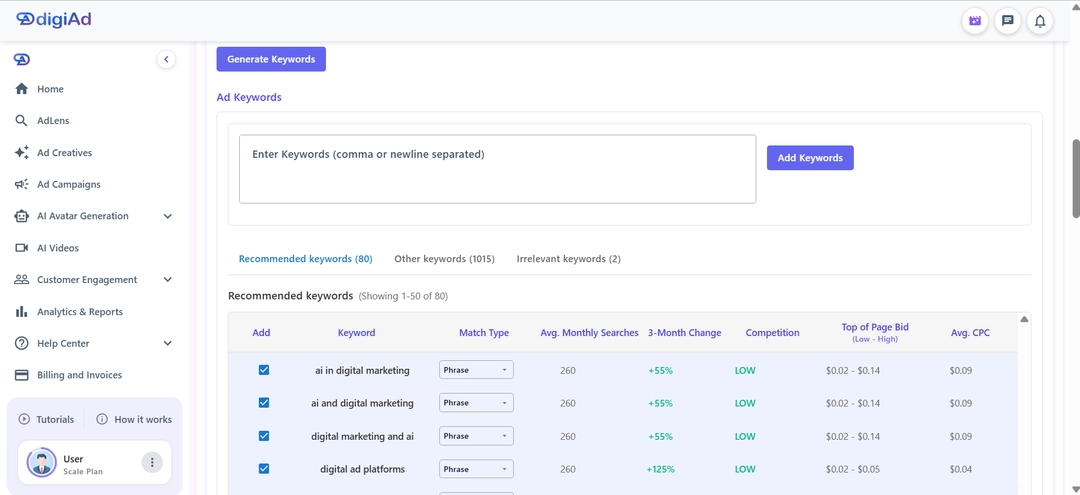
Input specific words users type into search engines that trigger your ad

Add Site Links: Include extra URLs to your ad to show more about your business and give users more ways to click.

Launch your optimized search campaign and start capturing high-intent leads

KEY FEATURES

What You Get ?

Dynamic Headline Generation

Create multiple detailed descriptions that explain your offer and include strong calls to action

Optimized Descriptions

Write several concise body descriptions that clearly highlight your offer while using strong, compelling calls to action that encourage immediate engagement.

Platform-Native Ad Structures

Group your generated copy into perfect formats ready to be plugged directly into the Google RSA builder or X (Twitter) campaign manager

Intelligent Keyword Mapping

Input a list of required keywords, and the AI will naturally weave them into the search ad copy to boost your Quality Score

Tone & Angle Controls

Tell the AI to write the search ad in a specific tone—professional, urgent, conversational, or heavily promotional

Direct Copy Exporting

Easily copy your finalized text structures or export them directly into CSV files for bulk uploading to your ad accounts

Own the SERP with optimized search copy in minutes

Generate headlines and descriptions that respect limits, weave keywords, and win high-intent clicks

Launch My First Search Ad

Schedule a Demo

Frequently Asked Questions

Find answers to common questions about digiAd AI and how it can help transform your digital marketing.

Search Campaigns FAQ

Q1. What is a Search Campaign in digiAd AI?

A Search Campaign in digiAd AI lets you run text-based ads that appear on search engine results pages (SERPs) when users search for keywords related to your product or service. These ads target high-intent users — people actively looking to buy — making them one of the highest-converting ad formats available. While search ads are text-based, you can also generate ad images for your search landing page to ensure a consistent visual experience for your customers.

Q2. How does digiAd AI simplify search campaign setup?

digiAd AI uses AI to assist with keyword research, ad copy generation, match type selection, and bid strategy — reducing the complexity of traditional platforms like Google Ads. You describe your product or business, and the AI suggests the best keywords and ad copy to maximize qualified clicks.

Q3. What search platforms do Search Campaigns run on?

digiAd AI Search Campaigns are designed to run on major search engines. The platform connects to the relevant search ad networks and handles campaign trafficking, so you don't need to manage multiple platform logins separately.

Q4. How does keyword targeting work for Search Campaigns?

You can input your own keywords or let the AI suggest high-intent keywords based on your product description. Keywords can be set to broad, phrase, or exact match types. The AI prioritizes bottom-of-funnel, purchase-intent keywords to ensure your budget targets buyers rather than casual browsers.

Q5. How is a Search Campaign different from a Display Campaign?

Search Campaigns show text ads to users who are actively searching for something — they're intent-triggered. Display Campaigns show image ads to users browsing websites, based on interests and demographics. Search campaigns typically deliver higher purchase intent, while Display campaigns excel at brand awareness. You can compare Search vs Display Campaigns to see which best fits your current business goals.

Q6. Can I control my daily or monthly ad spend budget?

Yes. You set your daily or monthly budget cap directly in the campaign setup. digiAd AI's AI optimizes amounts within your budget to maximize clicks and conversions. You can adjust, pause, or stop spend at any time.

Q7. Does digiAd AI write the text ad copy automatically?

Yes. The AI generates multiple headline and description variations based on your product, target audience, and keyword themes. You can accept, edit, or regenerate the copy before launching. The AI follows character limits and best practices for each platform.

Q8. What performance metrics can I track for Search Campaigns?

You can track impressions, clicks, CTR (click-through rate), average CPC (cost per click), conversions, ROAS (return on ad spend), and Quality Score indicators — all from the digiAd AI Performance Dashboard, where you can track search campaign ROI in real-time.

Q9. What is a good budget to start a search campaign?

For most small businesses, starting with ₹100–₹500/day is sufficient to gather meaningful data on keyword performance. The AI helps allocate this budget efficiently, pausing underperforming keywords and reallocating to high-performing ones automatically.

Q10. Can I run Search Campaigns and Display Campaigns simultaneously?

Yes. digiAd AI's Campaign Manager supports running multiple campaign types simultaneously. Running Search and Display together creates a full-funnel strategy. You can see all campaign types available in the Campaign Manager to build your perfect marketing mix.

Q11. How can I track the performance of my campaigns?

You can monitor all key performance metrics for your campaigns directly within the digiAd AI platform, eliminating the need to manage multiple platform logins. In addition, detailed performance reports are automatically sent to your registered email ID every 3 hours, so you stay updated without any manual effort.

Q12. Is there a minimum contract or lock-in period for running Search Campaigns?

No. digiAd AI operates on a flexible subscription model with no minimum campaign contract. You can start, pause, or stop campaigns at any time based on your business needs. To explore our flexible plans, you can get started with digiAd AI today.

LIVE

digiAd Give Away · Win up to ₹50,000 INR cash · Subscribe any monthly plan before 30 June 2026 · Win ₹399→₹4K · ₹999→₹10K · ₹1,999→₹20K · ₹4,999→₹50K . One winner per plan · Draw: 1–5 July · Cash reward · T&C apply||

digiAd Give Away · Win up to ₹50,000 INR cash · Subscribe any monthly plan before 30 June 2026 · Win ₹399→₹4K · ₹999→₹10K · ₹1,999→₹20K · ₹4,999→₹50K . One winner per plan · Draw: 1–5 July · Cash reward · T&C apply||

00

days

:

00

hrs

:

00

min

:

00

sec

🎁

LIVE

00d:00h:00m:00s

digiAd Give Away · Win up to ₹50,000 INR cash · Subscribe any monthly plan before 30 June 2026 · Win ₹399→₹4K · ₹999→₹10K · ₹1,999→₹20K · ₹4,999→₹50K . One winner per plan · Draw: 1–5 July · Cash reward · T&C apply||

digiAd Give Away · Win up to ₹50,000 INR cash · Subscribe any monthly plan before 30 June 2026 · Win ₹399→₹4K · ₹999→₹10K · ₹1,999→₹20K · ₹4,999→₹50K . One winner per plan · Draw: 1–5 July · Cash reward · T&C apply||

🎁
Search Boost

Reach Customers the Moment They Search for You

Launch text ads that appear directly in search results when high-intent users are actively looking for your product or service. Set your budget, define your audience, and go live — all from your digiAd AI dashboard in one place.

PPC search text ad with headline, URL, and description lines
Responsive search ad preview with alternate headline options
Sponsored SERP text creative with strong call to action
High-intent paid search listing mockup for keywords
Search campaign ad card with display path and offer line
Keyword-focused SEM headline and description layout
Compact mobile search ad creative with tight copy
Expanded text search ad with multi-line descriptions
PPC search text ad with headline, URL, and description lines
Responsive search ad preview with alternate headline options
Sponsored SERP text creative with strong call to action
High-intent paid search listing mockup for keywords
Search campaign ad card with display path and offer line
Keyword-focused SEM headline and description layout
Compact mobile search ad creative with tight copy
Expanded text search ad with multi-line descriptions

Plan, create, launch, and optimize your search campaigns—all in one place.

Your Master AI Search Copywriter

INSIGHTS

Your Master AI Search Copywriter

Writing search ads manually means counting characters, testing headline combinations, and rewriting descriptions for every campaign. digiAd's Search Ad Generator eliminates that work. Paste your URL or keywords, and get headlines and descriptions in minutes, all within the exact character limits of Google and X (Twitter).

  • CTR-focused hooks

  • Keyword-smart copy

  • Export-ready

What You Can Do ?

Text-Only Precision

A dedicated search copywriting workspace - no image tools, no distractions. Every field is built for Google and X (Twitter) text ads: headlines, descriptions, and CTAs only.

Flawless Character Counts

Never rewrite an ad again. Our engine strictly enforces 30-character headlines and 90-character descriptions every single time.

High-Intent CTAs

Choose from a curated library of high-intent CTAs each one tested and optimized for search engine click-through performance.

Multi-Platform Ad Sync

Generate headlines and descriptions in one flow, perfectly formatted for both Google’s RSAs and X (Twitter) text ads.

HOW IT WORKS
4 Steps to High-Performing Search Copy

01

High-Intent Lead Objective

  • Select Ad Campaigns from the sidebar
  • Set the Objective to Lead Generation or Direct Sales
  • This captures people actively searching for your service or product
High-Intent Lead Objective
02

Performance Budgeting

  • Set your Daily Budget for high-value search capture
  • Schedule your ads specifically for hours when your business is available
  • Maximize your response rate by aligning with operating hours
Performance Budgeting
03

Search Interest & Location

  • Define the Geo-Fencing for where your service is available
  • Focus on target search terms as the primary indicator of intent
  • Demographics are optional where search intent is the main driver
Search Interest & Location
04

Keyword Engineering & CPA Bidding

  • Input specific words users type into search engines that trigger your ad
  • Add Site Links: Include extra URLs to your ad to show more about your business and give users more ways to click.
  • Launch your optimized search campaign and start capturing high-intent leads
Keyword Engineering & CPA Bidding

KEY FEATURES

What You Get ?

Dynamic Headline Generation

Create multiple detailed descriptions that explain your offer and include strong calls to action

Optimized Descriptions

Write several concise body descriptions that clearly highlight your offer while using strong, compelling calls to action that encourage immediate engagement.

Platform-Native Ad Structures

Group your generated copy into perfect formats ready to be plugged directly into the Google RSA builder or X (Twitter) campaign manager

Intelligent Keyword Mapping

Input a list of required keywords, and the AI will naturally weave them into the search ad copy to boost your Quality Score

Tone & Angle Controls

Tell the AI to write the search ad in a specific tone—professional, urgent, conversational, or heavily promotional

Direct Copy Exporting

Easily copy your finalized text structures or export them directly into CSV files for bulk uploading to your ad accounts

Own the SERP with optimized search copy in minutes

Generate headlines and descriptions that respect limits, weave keywords, and win high-intent clicks

Frequently Asked Questions

Find answers to common questions about digiAd AI and how it can help transform your digital marketing.

digiAd AI - AI-Powered Marketing Platform Logo

AI-powered ad platform helping marketers create, launch, and optimize campaigns in minutes.

Product

Contact Us

sales@digiad.ai

Need Help?

Legal Policy

© 2025 Xalt Analytics Private Limited. All rights reserved.
InstagramTikTok