Image Ad
Image Ad
Launch Image Ad CampaignsAcross the Web In Minutes
Run visually engaging display campaigns on Google, Facebook, Instagram, and more across websites, apps, and social feeds targeting your ideal customers by demographics, interests, and behavior directly from digiAd AI.
Launch My First Image Ad
No credit card required
Free plan available
INSIGHTS
Run Display Campaigns Across Every Platform, From One Place
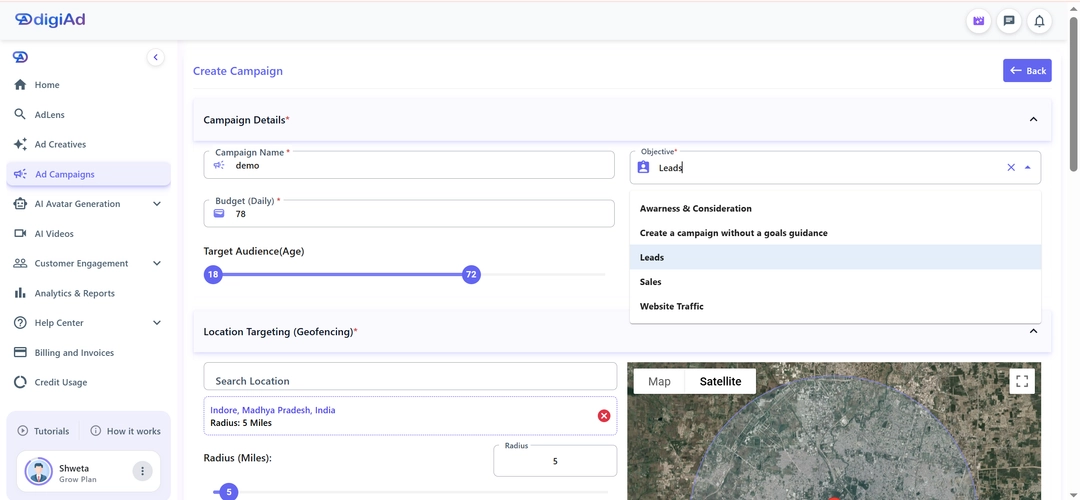
Setting up display campaigns manually means logging into Google Ads, then Meta, then TikTok, entering the same budget, audience, and objectives over and over again on each platform. digiAd AI eliminates that. Enter your campaign details such as objective, budget, schedule, target audience, age, gender, location and launch your display ads across Google, Facebook, Instagram, TikTok, Snapchat, and X simultaneously, all without leaving digiAd AI.
Templates + your product.
**One Setup, Six Platforms**: Google, Facebook, Instagram, TikTok, Snapchat & X — All From A Single Dashboard
**Full Campaign Control**: Set Objective, Budget, Schedule, Audience, Location & Gender In One Place
**No Platform Switching**: Skip The Individual Ad Managers — Launch Everything Directly From digiAd AI
What You Can Do ?
One-Click Ads & Studio
Choose between instant, high-converting One-Click generations or deep-dive manual customization in our Creative Studio
Advanced Template Hub
Choose from 100+ pro-grade templates sized for Instagram (1:1), Stories (9:16), and Facebook Feed (1.91:1) — AI matches your brand style automatically
Smart Brand Integration
Automatically bake your brand logo and contact details , phone, email, and address directly into your generated ad creative
Reference Image Logic
Select up to 3 scraped images from your website to guide the AI, ensuring 100% visual consistency across all ad variations
EXAMPLES
Image Ads that Earn the Click
Preview styles teams use for feed, story, and display placements
HOW IT WORKS
4 Steps from URL to Launching Pro Image Ads
Scrape, brand, pick templates, generate and save
Step 01
Reach & Visibility Objective
Select Ad Campaigns from the sidebar
Set the Objective to Website Traffic or Brand Awareness
Optimizes for the widest possible reach across external websites and apps
Step 02
Impression Budgeting
Define your budget; display ads are often cheaper per 1,000 views
Reach a massive audience with optimized spend
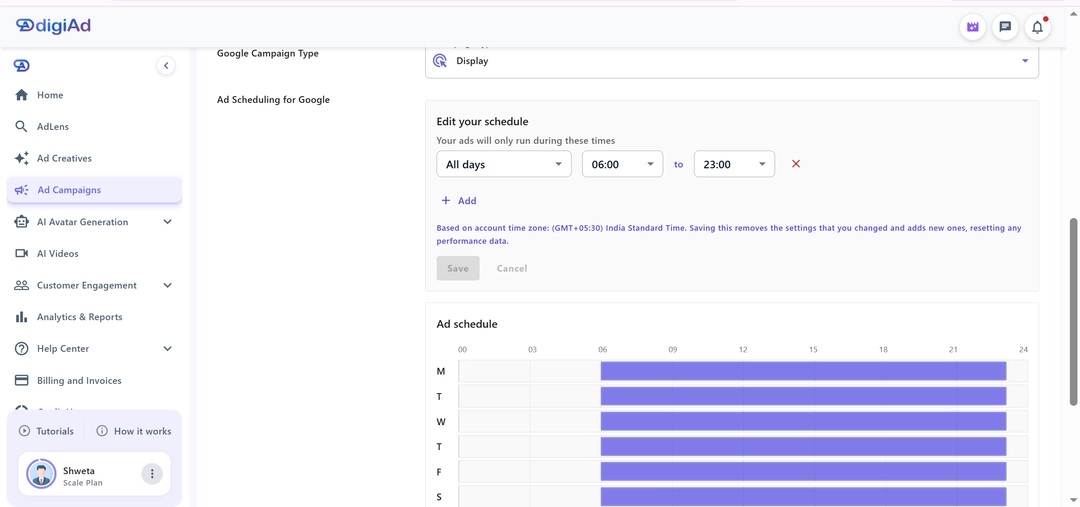
Set the scheduling to match your brand's promotional period
Step 03
Geo-Local Precision
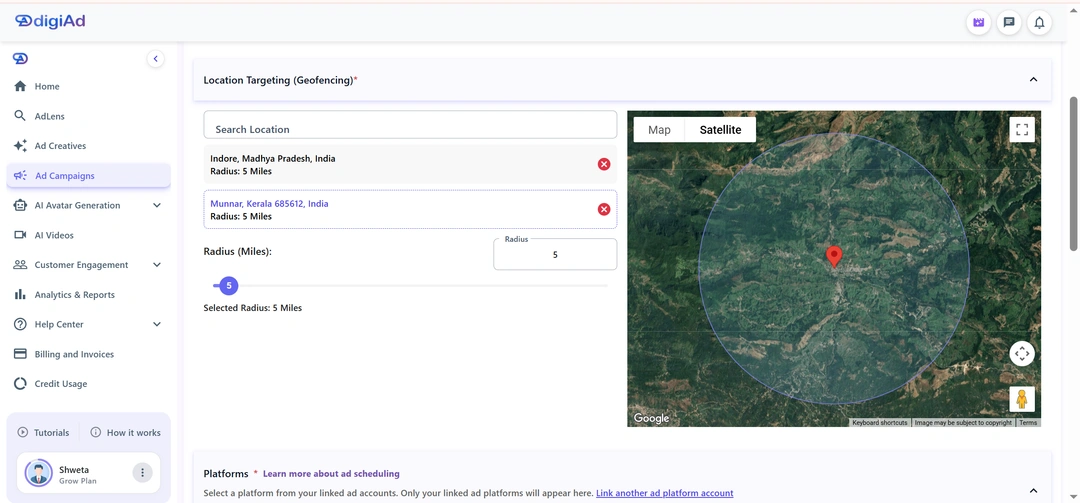
Map Targeting: Use Geo-Fencing to target specific neighborhoods or business zones
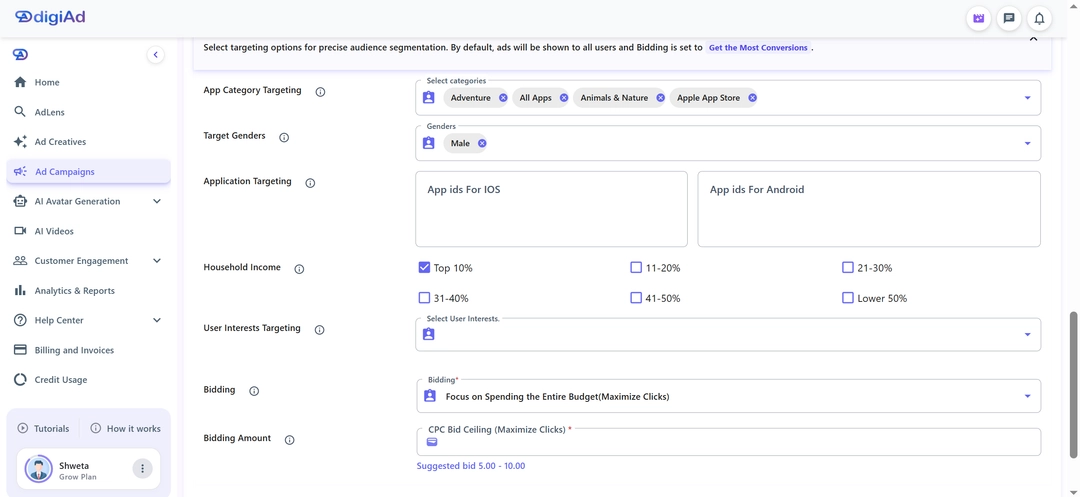
Gender/Age: Set broad demographic filters for awareness
Precision mapping ensures your visuals find the right eyes
Step 04
Network Selection & CPC Bidding
Confirm your connection to the Google Display Network or social feeds
Set the bidding to Maximize Clicks to drive volume to your landing page
Launch and monitor your multi-network display campaign
KEY FEATURES
What You Get ?
Multi-Platform Auto-Sizing
Never fight with dimensions again. Output your generated image ad perfectly sized for Instagram, Facebook, and Display Networks with one click
Premium Image Templates
Gain access to a regularly updated collection of visual ad templates tuned specifically for SaaS, e-commerce, and info-products
Custom Asset Layering
Have your own media? Seamlessly import your raw product photos, transparent logos, or custom backgrounds directly into the canvas
Batch Ad Generation
Generate 10+ ad variations simultaneously and run A/B tests across campaigns — find your top performer without extra design hours
Intelligent Subject Framing
As you fit uploads into our templates, our system automatically detects and frames your core product so it remains the focal point of the ad
Centralized Creative Library
After generating the perfect layout, securely store your image ads within your digiAd account for immediate campaign deployment
Ship high-converting image ads without a design team
Upload your product, pick a proven layout, and export network-ready statics in minutes
Launch My First Image Ad
Schedule a Demo
Frequently Asked Questions
Find answers to common questions about digiAd AI and how it can help transform your digital marketing.
Display Campaigns FAQ
Q1. What are Display Campaigns in digiAd AI?
Display Campaigns allow you to run image-based ads across a wide network of websites, apps, and social media feeds. Unlike search ads triggered by keywords, display ads reach users based on their interests, browsing behavior, and demographics — ideal for building brand awareness and staying top-of-mind with potential customers.
Q2. Where exactly do my Display Campaign ads appear?
Your display ads can appear across major ad networks including the Google Display Network (millions of partner websites and apps), social media feeds like Facebook and Instagram, X, Snapchat, TikTok and contextually relevant content sites in your industry. digiAd AI manages placements to reach your target audience at the right time and context.
Q3. What image formats and sizes are needed for Display Campaigns?
digiAd AI's AI Image Builder and Template Creator automatically generate all required display ad sizes — 1:1, 9:16, 16:9. You don't need to manually create each size; the platform handles multi-size generation automatically.
Q4. Can I use AI-generated images from digiAd AI in my Display Campaigns?
Yes, and this is the most powerful workflow. You generate your ad creatives using the AI Image Builder or Template-Based Image Creator, then deploy them directly into Display Campaigns — all without leaving digiAd AI. You can create your display ad images with AI to ensure a professional and high-converting look.
Q5. How does audience targeting work for Display Campaigns?
You can target audiences based on demographics (age, gender, location, income), interests (shopping, fitness, technology, etc.), and in-market segments (users actively researching products like yours).
Q6. What is the difference between Display Campaigns and Social Feed Campaigns?
Display Campaigns primarily target users on third-party websites and the open web, while social feed placements appear within the native feed of platforms like Facebook and Instagram. digiAd AI's Display Campaigns can encompass both. You can also schedule your display creatives on social media directly from our publisher tools.
Q7. How do I know if my Display Campaigns are working?
The Performance Dashboard provides real-time data on impressions, reach, click-through rate (CTR), viewability, and conversions. You can break down performance by placement and creative, allowing you to measure display campaign performance and optimize your budget for the best ROI.
Q8. What budget should I start with for Display Campaigns?
Display ads typically have a lower cost-per-click than search ads, making them accessible even on modest budgets. Starting with ₹100–₹300/day allows you to test multiple creatives and audiences, with the AI optimizing performance as data accumulates.
Q9. Can Display Campaigns be run alongside Search Campaigns for better results?
Yes, and it's highly recommended. Running both creates a full-funnel strategy — Search campaigns capture ready-to-buy users, while Display campaigns build brand awareness. We suggest you add Search Campaigns for full-funnel coverage and a more consistent customer journey.
Q10. Does digiAd AI automatically create multiple ad sizes for display?
Yes. When you launch a Display Campaign, the platform automatically generates responsive ad units that adapt to different placement sizes. For more visual variety, you can explore Carousel Campaigns for richer display formats and tell a more detailed brand story.